


The Dynamic Host Configuration Protocol (DHCP) can automate the configuration of new systems added to networks and improve the management of existing systems on networks using Internet Protocol version 4 (IPv4) and IPv6. Deploying and configuring DHCP for IPv6 (DHCPv6) is one way to assign addresses on an IPv6-enabled network. Stateless Address Autoconfiguration (SLAAC) is another way to assign addresses on an IPv6-enabled network.
DHCPv6 is not just the familiar DHCP for IPv4 (DHCPv4) transliterated into IPv6 – and you need to understand the differences before planning for and deploying DHCPv6. This article explains those differences at length. This article offers historical background describing some of the differences between DHCPv6 and DHCPv4, and how DHCPv6 and SLAAC changed network administration.
DHCPv6 comes in 2 flavors: stateless DHCPv6 (originally called DHCPv6 Lite) which uses SLAAC, and stateful DHCPv6 which does not. This presentation can help you decide whether you really need DHCPv6 on your network. (It is not a given.) This article explores the differences between DHCPv4 and stateful DHCPv6.
This article includes a table that provides a quick review of the DHCPv6 and SLAAC options that various operating system manufacturers support.
This article is organized into 5 parts:
- Review of basic functionality and terminology for DHCPv6
- Review of basic functionality and terminology for SLAAC
- Configuration examples for different DHCPv6 clients, servers, and relay agents
- Definition and prevention of rogue Router Advertisements (RAs)
- Reference documents for DHCPv6.
1. Review of basic functionality and terminology for DHCPv6
This paper by Benjamin Long at the University of New Hampshire InterOperability Laboratory was written in 2009. It provides a basic overview of DHCPv6 configurations, Domain Name Server (DNS), and Session Interface Protocol (SIP) concepts, defines relevant terminology, and discusses issues to consider when configuring DHCPv6 servers and relay agents, or when deploying cascading relay agents. This paper (part1 and part2) written in 2014 goes into more detail on the creation of client addresses on DHCPv6-enabled networks.
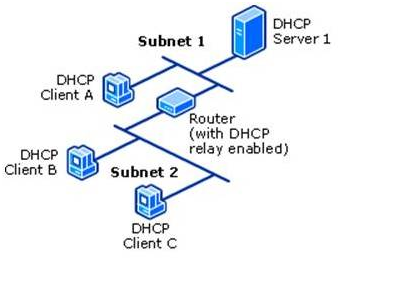
The DHCPv6 server is usually on a different link/subnet than most of its clients. On each link where the DHCPv6 server is not directly connected but clients are present, a router on the link must be configured as a relay agent. That router will typically be the one that also transmits RAs for that link as described by Internet Engineering Task Force (IETF) Request for Comments (RFC) 8106. Depending on the network topology, a series of cascading relay agents (either routers or computers) are configured on the intermediate links between the DHCPv6 server’s link and the clients’ links.
Note: A 2022 tutorial on the many aspects of DHCPv6 can be found in this All Things TECH IPv6 DHCP (DHCPv6) Server & Client Explained article.
2. Review of basic functionality and terminology for SLAAC
The article IPv6 Address Management – stateless, stateful, DHCP ... oh, my! discusses basic SLAAC, stateless DHCPv6 + SLAAC and stateful DHCPv6 addressing. Part 1 and part 2 of this article discusses SLAAC addressing in more detail. This article discusses two underlying features of IPv6 that enable SLAAC: Neighbor Discovery Protocol (NDP) and Internet Control Message Protocol (ICMP) for IPv6 (ICMPv6), while this article discusses Unique Local Addresses (ULA), and this article (and an update to it) discusses Extended Unique Identifier 64-bit (EUI-64) addressing. RFC 8981 discusses an extension to DHCP that enables hosts to generate temporary addresses with randomized interface identifiers.
Note: A 2022 tutorial on the many aspects of SLAAC can be found in this All Things TECH IPv6 Configuration, EUI-64, SLAAC & Dual Stack article and a tutorial on the many aspects of ICMPv6 can be found in this All Things TECH ICMPv6 and IPv6 Neighborships article.
3. Configuration examples for different DHCPv6 clients, servers, and relay agents
The National Institute of Standards and Technology Special Publication 800-119, Guidelines for the Secure Deployment of IPv6, was written by Sheila Frankel, et al, in 2010. It covers a wide range of subjects about the IPv6 protocol. In particular, section 3.5.4 and sections 4.7 through 4.7.3 (inclusive) discuss selected DHCPv6 and SLAAC topics:
- Tradeoffs between use DHCPv6 and SLAAC
- RA flag configurations
- Exchanges of messages between DHCPv6 server and client
- Security ramifications of DHCPv6.
The Samenwerkende Universitaire Reken Faciliteiten Network (SURFNet) IPv6 Deployment In Local Area Networks was written by François Kooman in 2011. It discusses static, SLAAC, and DHCPv6 address assignment mechanisms in more detail than SP800-119. It also discusses static, Recursive DNS Server (RDNSS), and DHCPv6 DNS assignment mechanisms.
On the PennState IPv6 Home website, this page provides configuration examples or links to examples for several DHCPv6 servers, including Cisco IOS, Dibbler, ISC, Nominium, and Microsoft Windows. That same page also provides configuration examples or links to examples for a variety of clients, including AIX, FreeBSD, Apple macOS and OS X (w/ Dibbler), Red Hat, Solaris, Ubuntu, and Microsoft Windows (w/ and w/o Dibbler). On the Juniper website, this article provides a configuration example for a Juniper JUNOS DHCPv6 server. This list of articles provides configuration documentation for DHCPv6 on Cisco IOS.
The article Setting up DHCPv6 to Dynamically Issue IPv6 Addresses in a Network describes the configuration of a Windows 2008 R2 (and later) dual-stack DHCP (DHCPv6 in addition to legacy DHCPv4) server and its clients while another article describes the configuration of a Windows 2012 (and later) dual-stack DHCP server. Maintaining pre-assigned static IPv6 addresses for routers and other infrastructure elements (DHCP Reservations), and how to set up more than one DHCP server are also covered.
Relay agent configurations for Nokia routers are described in this article, for Extreme Networks NetIron routers in this article (page 397), for Cisco IOS routers in this article, for Juniper JUNOS routers in this article, for Linux computers using dhcp6r or rtadvd, and for Microsoft Windows computers in this article. Additional relay agent configurations for Cisco Control And Provisioning of Wireless Access Points (CAPWAP) Access Controller (DHCPv6 Option 52 per RFC 5417), DHCPv6 Client Link-Layer Address Option per RFC 6939, and DNS Search List (DNSSL) Option per RFC 8106 are described in this article .
4. Definition and Prevention of rogue Router Advertisements (RAs)
On every link, there should be only one relay agent transmitting RAs. Whether by accident or malice, RAs transmitted by any unauthorized relay agent are called rogue RAs. By usurping the role of the relay agent authorized to send out RAs, such rogue RAs cause confusion and misconfiguration of other systems on the link. Rogue RAs are described in more detail by RFC 6104. Various vendors are actively implementing RA Guard, described by RFC 6105, to make it easier to detect and block Rogue RAs. RFC 7113, an update to RFC 6105, suggests ways to mitigate attempts to circumvent RA Guard.
A frequent source of accidental rogue RAs is the addition of a Microsoft Windows system that has Internet Connection Sharing enabled to an existing network, as discussed in the Windows Internet Connection Sharing (ICS) article in the Security section. Additional causes of rogue RAs and approaches to dealing with them are described in Section 5.2 of Nippon Telegraph and Telephone (NTT) Information Sharing Platform Laboratories Deploying IPv6: Problems and Solutions.
This Cisco white paper provides an in-depth description of the situation and suggests ways to detect and prevent rogue RAs. On the PennState IPv6 Home website, the IPv6 Security web page describes general IPv6 security techniques. In particular, the RA filtering and Rogue DHCPv6 server sections of that web page provide RA filtering or blocking suggestions for Cisco, HP, Juniper, and 3Com routers. This article discusses disabling RAs on both routers and hosts.
5. Reference documents for DHCPv6
- Nokia OS
- Extreme Networks NetIron IPv6 Configuration (page 139)
- Cisco IOS Switch and DHCP Server
- Juniper JUNOS
- Oracle Solaris
Introduction
An application server can only be accessed via IPv6 from other computers when its host Operating System and Local Area Network (LAN) segment are IPv6-enabled. The steps required to enable IPv6 on a host Operating System (if required) and on LAN equipment are described by separate articles in the IP Transport section of the IPv6 knowledge base.
Since 2011, all Microsoft Windows application servers support IPv6. This Microsoft article reviewed Microsoft applications server and Operating Systems IPv6 support status as of Sept, 2017. The current IPv6 support status of Microsoft applications servers are given below in Further Resources. Adding IPv6 support to non-Microsoft software is discussed by the Application Conversion Introduction and Application Conversion Tools articles in the Applications section.
During Feb, 2011, Rand Morimoto published an 8-part series of articles on the NetworkWorld website. In this series, he described and gave examples of the steps required to deploy IPv6 across a Small-Medium Business (SMB) Microsoft environment. The specific application server configuration examples are applicable to any environment. These articles cover many important infrastructure elements, and are summarized below:
Part 1: Getting Serious with IPv6 in a Windows Networking Environment
Part 2: IPv6 Addressing, Subnets, Private Addresses
Part 3: IPv6 Static Addressing and DNSv6
Part 4: Setting up DHCPv6 to Dynamically Issue IPv6 Addresses in a Network
Part 5: Configuring Microsoft Active Directory to Support IPv6
Part 6: Configuring IPv6 Routing through IPv4 in a Microsoft Windows Environment
Part 7: Best Practices at Configuring Applications for IPv6 for a Microsoft Windows Environment
Part 8: Planning Your Cutover to IPv6 for Your Microsoft Windows Environment
The paragraphs below provide links to the individual NetworkWorld articles. It might be helpful to read Part8 (written last) after reading the introductory material contained in Part1 and before looking at the details contained in Part2 through Part7.
The series of articles was published based on the then current release of Windows Server, 2008 R2. Unless otherwise noted, the steps required to deploy IPv6 in Windows Server 2008 R2 apply to later releases. Since that time, subsequent releases of Windows Server have added additional capabilities supporting IPv6 including:
a. Among the capabilities new to Windows Server 2012:
Internet Protocol Address Management (IPAM) feature described here
b. Among the capabilities new to Windows Server 2016:
built-in IPv6 root hints described here
support for Software Defined Networking (SDN)
c. Among the capabilities new to Windows Server 2019:
capability to support dual-stack (IPv6 in addition to legacy IPv4) and IPv6-only SDN
d. A description of the many new and updated capabilities of Windows Server 2022 is available here.
Part 1: Getting Serious with IPv6 in a Windows Networking Environment
The article provides a quick summary of the steps necessary for an organization to implement and really use IPv6 in a Windows networking environment:
a. upgrade as necessary and then enable IPv6 on Active Directory Servers, Domain Name Servers, Dynamic Host Protocol Servers,
b. upgrade as necessary and then enable IPv6 on client systems (if necessary – most upgraded client systems will already have IPv6 enabled by default),
c. upgrade as necessary and then enable IPv6 on internal servers (for example, Exchange, Sharepoint, SQL and the like),
d. upgrade as necessary and then enable IPv6 on local internetworking equipment, and
e. enable IPv6 routing between local internetworking equipment and the external Internet.
In addition, the Getting Serious with IPv6 in a Windows Networking Environment article also includes (from the perspective of 2011):
1. a short discussion of IPv4 address exhaustion issues and
2. some answers to questions about why IPv4 address exhaustion is really a problem.
Part 2: IPv6 Addressing, Subnets, Private Addresses
The IPv6 Addressing, Subnets, Private Addresses article provides an introduction to IPv6-style Addressing, Subnetting, Private Addressing, Gateways, and Routing from the perspective of someone familiar with IPv4. For additional information about IPv6 subnetting, see the IPv6 Subnet Planning topic in the IPv6 Address Plans article in the Network Management section.
Part 3: IPv6 Static Addressing and DNSv6
The IPv6 Static Addressing and DNSv6 article provides examples of how to configure IPv6 addressing for Windows server and client systems, and an example of how to configure a Windows 2008 R2 server as the Domain Name System (DNS) server for a Windows domain.
While IPv6 Static Addressing and DNSv6 does not explain why pre-assigned static IPv6 addresses for Windows 2008 R2 (or later) servers are recommended, the IPv6 Address Configuration topic in this article does. (Although written for specific versions of Windows Server systems, both the IPv6 Static Addressing and DNSv6 article and the IPv6 Address Configuration topic in this article also apply to later versions.) To suppress transmission of Dynamic Host Control Protocol (DHCP) version 6 (DHCPv6) SOLICIT messages for interfaces with pre-assigned static IPv6 addresses during on-going system operation, running PowerShell as an Administrator early in the system installation process and executing the cmdlet
Set-NetIPInterface <interface-id> -AddressFamily IPv6 -Dhcp Disabled
for each such interface is recommended.
Part 4: Setting up DHCPv6 to Dynamically Issue IPv6 Addresses in a Network
The Setting up DHCPv6 to Dynamically Issue IPv6 Addresses in a Network article provides an example of how to set up a Windows 2008 R2 server as both the DHCP for IPv4 (DHCPv4) server and DHCPv6 server for a Windows domain, how to get the routers on the LAN to play nicely as relay agents, and some troubleshooting tips if it doesn’t work at first. Also, don’t overlook the role that Router Advertisements play in configuring the network. That is A Common Mistake with DHCPv6.
Pay close attention to the “DHCP Reservations” discussion (along with this article on the differences between reservations and exclusions). These tips are not limited to Microsoft Windows-centric infrastructures. An (unrelated) article provides examples of how to set up both DHCPv4 and DHCPv6 on Windows 2012 and later servers.
While Setting up DHCPv6 to Dynamically Issue IPv6 Addresses in a Network does not explicitly mention Stateless Address Autoconfiguration (SLAAC), it does discuss enabling/disabling Stateless DHCPv6 mode. Enabling Stateless DHCPv6 mode configures the server to use Stateless DHCPv6 (originally called DHCPv6 Lite) which uses SLAAC. There are significant differences between DHCPv4 and DHCPv6, as the DHCP and SLAAC on IPv6 Networks article in the Infrastructure section explains. On IPv6-only networks in Windows 8, 8.1 and early versions of Windows 10 clients SLAAC support was problematic, but the Creator Update release of Windows 10 (Version 1703 released 11 April 2017) added SLAAC support.
This Microsoft website describes how to set up an IPv6 test lab and extend it to test DNS Zone Transfers over IPv6, DHCPv6, and IPv6-only networking.
When cloning one Windows server already set up as a DHCPv6 server to create another server, delete the values (but NOT the keys) in the cloned server for
HKLM>CurrentControlSet>services>TCPIP6>Parameters>Dhcpv6DUID
HKLM>CurrentControlSet>services>TCPIP6>Parameters>Interfaces>{INT}>Dhcpv6IAID
Part 5: Configuring Microsoft Active Directory to Support IPv6
The Configuring Microsoft Active Directory to Support IPv6 article provides a description of how easy getting Active Directory (AD) Domain Controllers (DC) and Global Catalogs (GC) set up with IPv6 can be when things are done in the right order. It is also a good practice to review pre-existing AAAA entries in DNS and remove those that do not conform to your intended DHCPv6 policies.
Part 6: Configuring IPv6 Routing through IPv4 in a Microsoft Windows Environment
The Configuring IPv6 Routing through IPv4 in a Microsoft Windows Environment article solves a problem that, since it was written, has largely gone away. It provides examples of how to configure the 6to4, Teredo, IP-HTTPS and DirectAccess IPv6 transition mechanisms. These IPv6 transition mechanisms are provided “just in case” -- most businesses will not need to use them. It also provides a discussion of Tunnel Brokers which are still occasionally helpful when getting started with an IPv6 deployment, and Hyper-V, which is helpful when configuring routing in virtualized environments. In Sept, 2008, Rand Morimoto and Jeff Guillet published a book Windows Server 2008 Hyper-V Unleashed. This chapter from that book discusses Hyper-V in Server 2008 R2. This paper discusses Hyper-V in Server 2012, Server 2012 R2 and Server 2016. This article discusses Hyper-V in Server 2019. There will not be a new version of Hyper-V for Server 2022. Instead, the version used in Server 2019 will continue to be supported in Server 2022 (and later), until January 2029.
The IP Helper service should only be enabled on a server supporting an IP-HTTPS or DirectAccess IPv6 transition mechanism. In other cases it should be turned off and disabled.
Part 7: Best Practices at Configuring Applications for IPv6 in a Microsoft Windows Environment
The Best Practices at Configuring Applications for IPv6 in a Microsoft Windows Environment article focuses on Operating System configuration and host naming issues, but does not provide any specific guidance for individual application servers. For such guidance, see Further Resources below. For some Microsoft Windows application servers, IPv6-enabling its host Operating System and LAN segment may be all that is required.
Guidance on managing connections to system services on Windows Server 2016 or 10 Enterprise and later is provided in this article. Guidance on disabling system services on Windows Server 2016 or later with Desktop Experience is provided in this article. Beginning with Windows Server 2019, system services are configured in accordance with that guidance by default.
Part 8: Planning Your Cutover to IPv6 for your Microsoft Windows Environment
The Planning Your Cutover to IPv6 for your Microsoft Windows Environment article describes some additional steps to take before, during and after steps described in Part 2 through Part 7.
For reference purposes, NetworkWorld subsequently made the entire 8-part series available in a single document (although the articles appear in a different order than listed above).
Further Resources for Enabling IPv6 in Microsoft Windows Application Servers
The following links are for specific versions of Microsoft Windows application servers and software tools that support IPv6. Later versions will also support IPv6, even though they may not be explicitly listed below.
The learn.microsoft.com website can be a valuable resource when enabling IPv6 in Microsoft Windows software, although it may take some searching to find the guidance you need.
Additional deployment guidance for older versions of DirectAccess, Exchange, and Sharepoint, along with deployment guidance for file serving, print serving, and Active Directory is available here.
Azure Application Gateway (v2). IPv6 support is documented here
Azure Basic Load Balancer (same support is provided in Standard edition). IPv6 support by specific Azure features is documented here
Azure Virtual Network
DirectAccess (Windows Server 2008 R2 or earlier) – The NetworkWorld article referenced in Part 6 above contains links to a Deployment Guide and a video about deploying DirectAccess with IPv6, both prepared by Rand Morimoto
DirectAccess (Windows Server 2016 and later) – This article describes how to support DirectAccess on a multihomed server. This article describes how to migrate from the Routing and Remote Access Service (RRAS) role service in Windows Server 2012 or earlier (now combined with DirectAccess) to the Remote Access server role
DirectAccess (Windows Server 2016 and later) – articles describing how to support DirectAccess in an enterprise
Endpoint Configuration Manager – all versions
Exchange 2010 – An IPv6-only configuration is not supported (a dual-stack configuration is)
Exchange 2013 – An IPv6-only configuration is not supported (a dual-stack configuration is)
Exchange 2019 and later - This is available as either a standalone product or a licensed subset of Microsoft 365 (which was previously known as Office 365)
Internet Information Server (IIS)
IP-HTTPS – All releases
Lync 2010 (and its predecessor Office Communications Server 2007) – No IPv6 support.
Lync Server 2013 (In 2015, Lync was rebranded as Skype for Business)
Microsoft Deployment Toolkit (MDT) (Support for IPv6 varies with software being deployed and target environment. See a book like Mastering the Microsoft Deployment Toolkit by Stokes and Singer for more information.)
Microsoft Teams – IPv6 support is determined by the environment provided by the components used when configuring Teams, such as Microsoft 365
Microsoft Services 365 (previously Office 365) – Multiple versions exist and all support IPv6 with some limitations (IPv6-only devices require translation technologies such as DNS64 or NAT64, for example). A Microsoft 365 IPv6 URL and IP address ranges document is available, as is a Microsoft 365 IPv6 test plan. Inbound and outbound mail transport via IPv6 is supported upon request. As of April 2020, Office 365 became officially known as Microsoft 365
Microsoft 365 operated by 21Vianet in China – IPv6 is supported. There is an Microsoft 365 IPv6 URL and IP address ranges document specifically for 21Vianet in China separate from the one for Microsoft 365 mentioned above
Office 2013 – Multiple versions exist and all support IPv6.
Office 2019 and later - This is available as either a standalone product or a licensed subset of Microsoft 365
OneDrive – For individual accounts see this Quick Start guide and for business accounts and storage management go here. (Formerly known as SkyDrive)
OneDrive for Business – IPv6 support is also available (only in China) on 21Vianet. (Formerly known as SkyDrive Pro)
Project 2019 and later -- This is available as either a standalone product or a licensed subset of Office 365/Microsoft 365
Remote Access Service (see DirectAccess)
Sharepoint 2010 and later
Skype – Mobile clients (but only on 21Vianet in China).
Skype For Business Server 2015. Upgrading Skype for Business to Microsoft Teams is discussed in this article
Structured Query Language (SQL) Server 2014
Structured Query Language (SQL) Server 2016
Systems Center Configuration Manager 2012 – Starting in version 1910, SCCM became part of Endpoint Configuration Manager. A Microsoft ECM Frequently Asked Questions (FAQ) is available.)
Systems Center Operations Manager 2012 R2
Systems Center Virtual Machine Manager 2012
Windows Server Update Services (WSUS) – 4.0
The Microsoft website (www.microsoft.com) is another authoritative source for enabling IPv6 in specific application servers, although it may take considerable searching to find the guidance you need. Other Microsoft websites that can be useful are the IPv6 Survival Guide wiki and the Test Lab Guides.
This Cloud Computing using IPv6 article contains 7 topics:
- What is Cloud Computing?
- Secure Cloud Computing
- Cloud Service Providers that support Internet Protocol version 6 (IPv6)
- Open Source Cloud Computing Platforms
- United States Government (USG) IPv6 Cloud Policy and Guidance
- Cloud Computing available under General Service Administration (GSA) contracts
- Department of Defense (DoD) Cloud Computing
In addition, the SDN Lessons Learned, Training, and Testing article in the SDN Knowledge Base section provides some lessons learned while deploying cloud computing. Look for lessons learned with "cloud" in the title.
1. What is Cloud Computing?
The definition of computing has been slowly evolving for centuries. The concept of cloud computing has been rapidly evolving ever since it first appeared in 1996 or so. Since “cloud computing” is an even vaguer concept than “computing”, it is not realistic to expect a comprehensive yet terse description.
Many attempts have been made to describe the concept anyway. Here are some examples: The National Institute of Standards and Technology (NIST) offered an early terse technical description in 2011 and has since published several documents related to cloud computing. A company called ZDNET offered a broader, less-technical description with examples in 2022. Wikipedia articles offer even longer descriptions including a history of cloud computing and related concepts.
Cloud computing resources (often referred to as cloud native) are services and applications that are built specifically for use in a cloud computing environment. Cloud computing resources are variously called:
distributed (which includes edge computing and a superset of edge computing called fog computing),
private,
public,
hybrid,
multi-cloud (also called multicloud or multi),
and several other variations.
Cloud computing illustrates one of the most powerful forces in technology today: virtualization. An application accessing data residing in a cloud does not need to know:
- the physical storage media the data resides on (solid-state disc, mechanical disc, tape, or compact disc),
- the network protocol being used to access the data (IPv6 or IPv4) (when access occurs remotely), or
- the physical location of the storage media (in the next room, on the other side of the world, or even not on this planet).
2. Secure Cloud Computing
An informal overview of several of the technical concerns that must be addressed to achieve and maintain data security in cloud computing are described in this article, while an informal overview of several management concerns that must be addressed to achieve and maintain security are described in this article. Some approaches to maintaining technical security in the cloud include:
- Cloud Access Security Brokers (CASBs) support for IPv6 is described in this article,
- The Cloud Security Posture Management (CSPM) concept is discussed in this article, while several CSPM tools are described in this article, and
- Security Service Edge (SSE) is defined and discussed in this article.
Note: The CSPM concept discussed in item (2) above is quite different than the NIST cybersecurity program (CSP) concept discussed in this article.
Guidance about secure deployment of clouds may be found here:
- Cloud Security Alliance publications,
- The Cybersecurity and Infrastructure Security Agency (CISA) concept Cloud Security Technical Reference Architecture version 2.0, June, 2022 and Trusted Internet Connections 3.0: TIC Core Guidance Volume 3: Security Capabilities Catalog version 2.0, Oct, 2021
- NIST Cloud Computing Related Publications, ongoing
- NIST Zero Trust Publications, ongoing
- National Security Agency (NSA) Mitigating Cloud Vulnerabilities, January 2020
- Five CISA and NSA Cybersecurity Information Sheets on Cloud Security Best Practices, March, 2024.
3. Cloud Service Providers that support IPv6
it is important that clouds be accessible via IPv6, as this article explains. There are many lists of cloud service providers and the services that these providers offer varies widely. Some early lists that specifically did include providers accessible via IPv6 are available: here, here and here published in 2015. Since those lists were published, most cloud service providers have added support for or expanded their support of IPv6. It may not even be specifically mentioned in their marketing material. This is the case for Software-Defined Cloud Interconnect (SDCI) service providers. A survey of SDCI service providers is available here.
Leading cloud service providers typically also support hyperscale computing, and this article explains why.
Content and applications that only support IPv4 access may (or may not) become dual stack (IPv6 in addition to legacy IPv4) accessible when hosted by a cloud service provider that supports IPv6. Verify that content and applications that natively support IPv4-only will become dual stack accessible. Verify the additional cost for IPv6 support (if any). Verify that connectivity via IPv6 to the cloud service provider’s locations is available from the geographic locations included in your IPv6 deployment effort.
If IPv4-only content and applications will not become dual stack accessible, then you might want to consider using one of the other services or products described in the Content and Applications Delivery over IPv6 article in the IPv6 and IoT Frequently Asked Questions (FAQ) section. As was the case with cloud service providers, the services these platforms offer varies widely.
4. Open Source Cloud Computing Platforms
There are many, many open source cloud computing platforms and more are being announced all the time. This article lists several of them. As was the case with cloud service providers, the services these platforms offer varies widely. The Software for Open Networking in the Cloud (SONiC) is an open source network operating system (NOS) under the auspices of the Linux Foundation (The LF) (which was rebranded as the Mplify Alliance in Jun, 2025). It runs on switches and application-specific integrated circuits (ASICs) from multiple vendors. As was the case with cloud service providers, the services these platforms offer varies widely.
5. USG IPv6 Cloud Policy and Guidance
The requirements of the Federal Acquisition Regulations as amended in Dec, 2009 (as described in the IPv6 Boiler Plate Acquisitions Language article in the Deployment section) always apply.
Information about the Federal government’s security assessment, authorization, and monitoring of cloud vendors may be found on GSA’s FedRAMP website. Among other documents available on the FedRAMP website (see this listing) is an Agency Cloud Procurement Best Practices guide (also called "Creating Effective Cloud Computing Contracts for the Federal Government"). A listing of current FedRAMP Authorized Cloud Service Providers (CSPs) is also available on the FedRAMP website.
Policy and guidance about secure deployments of clouds may be found here:
- CISA Secure Cloud Business Applications (SCuBA) Project documents, ongoing
- Defense Information Systems Agency (DISA) Information Assurance Support Environment (IASE) DoD Cloud Computing Security website,
- Department of Homeland Security (DHS) Cloud Security Guidance version 0.2 document, and more recently in the Cloud Interface Reference Architecture documents (see the IPv6 and Trusted Internet Connections article for details),
- Federal CIO Council (CIOC) Information Security and Identity Management Committee (ISIMC) Guidelines for the Secure Use of Cloud Computing by Federal Departments and Agencies V0.41, July, 2011
IPv6 support may not always be an explicit requirement in recent government documents such as the Federal Cloud Computing Strategy, June, 2019, also called “Cloud Smart”, but it is required.
6. Cloud Computing available under GSA contracts
In October, 2010, the United States (US) General Services Administration (GSA) awarded 11 vendors spots on the first government-wide contract for cloud computing. The initial ordering period has ended for these blanket purchase agreements for infrastructure-as-a-service (IaaS), which included cloud storage, virtual machines and web hosting services with support for IPv6. Details for currently available cloud acquisition vehicles are available on the GSA website. More information about federal cloud computing is available on the Cloud.CIO.gov website. A Best Business Practices for US Government (USG) Cloud Adoption guide is available on the GSA website.
Also available from the 18F office of GSA’s Technology Transformation Services for use by Federal Agencies is the platform-as-a-service Cloud.gov, which is built on top of the open source Cloud Foundry cloud computing platform. Support for IPv6 by Cloud.gov is documented on its Compliance page: IPv6, HTTPS, DNSSEC, and Certificates. Gaining access to cloud.gov is documented on its Access page: Get access to cloud.gov.
7. DoD Cloud Computing
Some websites and documents that provide policy and guidance for cloud computing use and several platforms for use by DoD and its departments and agencies are listed below.
Websites and Documents
- The Army Cloud Plan, Oct, 2022
- US DoD Enterprise Cloud website
- Defense Information Systems Agency (DISA) Information Assurance Support Environment (IASE) DoD Cloud Computing Security website,
- Department of the Navy (DoN) Data Center and On-Premises Commercial Cloud Policy, Oct, 2022
- DoD Secure Cloud Computing Architecture (SCCA) Functional Requirements, Jan, 2017
- DoD Cloud Strategy, Dec, 2018
- DoD Cloud Computing Acquisition Guidebook, Defense Acquisition University, Nov, 2019
- DoD Use of Commercial Cloud Computing Capabilities and Services, Institute for Defense Analyses (IDA), Nov, 2015
- DoD and Air Force Continue to Define Joint Command and Control Efforts, Government Accountability Office (GAO), Jan, 2023
- Audit of the DoD’s Compliance with Security Requirements When Using Commercial Cloud Services, DODIG‑2023‑052, DoD Office of Inspector General, Feb, 2023
Platforms
- Defense Enterprise Office Solutions (DEOS)
- Cloud One by Air Force
- DoD Cloud Native Access Point (CNAP) Reference Design (RD), July, 2021, built using a DoD Enterprise Development, Security, and Operations (DevSecOps) RD, Mar, 2021, to access any of the Cloud Native Computing Foundation (CNCF) certified Kubernetes implementations, as described in this article.
- Joint Warfighting Cloud Capability (JWCC) multi-vendor Indefinite-Delivery, Indefinite-Quantity (IDIQ) contract managed by the Hosting and Compute Center (HAC).
The Infrastructure section provides a wide variety of information for individuals and organizations interested in benefitting from the experience of others for configuring software that implements network and infrastructure services. Examples of such services are cloud services, domain name service (DNS), host naming (DHCP), mail transport (SMTP), Microsoft Active Directory (AD), multicast, Postfix, Sendmail, Stateless Address Autoconfiguration (SLAAC), Virtual Private Networks (VPNs) and various web servers.
IPv6 and Virtual Private Networks (VPNs)
Enabling IPv6 in Microsoft Windows Application Servers
DHCP and SLAAC on IPv6 Networks
Note: A 2022 tutorial on the many aspects of IPv6 can be found in this All Things TECH IPv6 on Linux article.
Enabling IPv6
Open Software-Und-System-Entwiklung (openSUSE) Linux and SUSE Linux Enterprise Server (SLES) maintain parallel coordinated development tracks. Internet Protocol version 6 (IPv6) in openSUSE and SLES was enabled by default beginning in version 10.1. The system setup and configuration Yet another Setup Tool (YaST) fully supported IPv6 since version 10.3.
To enable IPv6 in openSUSE Linux version 11.4 and later, see this SDB: Native IPv6 article. Reboot when done. IPv4 will continue to run.
To enable IPv6 in SLES version 12 SP5 and later, see paragraph 17.2 IPv6 – The Next Generation Internet in chapter 17.2 of the SUSE Linux Enterprise Server 12 SDP Administration Guide. Reboot when done. IPv4 will continue to run. Also, in the absence of applicable policy or guidance about hardening SLES to guard against potential IPv6-related attacks, a guide for configuring SLES 12 and later to prevent IPv6-related attacks is provided by this article.
Disabling IPv6
To disable IPv6 in openSUSE Linux version 11 and later, see the How to Disable IPv6 article. Reboot when done for the reason given in this article. IPv4 will continue to run.
To disable IPv6 in SLES version 11 and later, see the How to Disable IPv6 article . Reboot when done for the reason given in this article. IPv4 will continue to run.