• Home
  • Who We Are
    • Strategic Plan
    • Our Vision and Mission
    • Program History
    • Program Governance
      • HPCMP Leadership
      • Executive Steering Group (ESG)
      • HPC Advisory Panel (HPCAP)
      • User Advocacy Group (UAG)
  • Solution Areas
    • Computation Centers
    • Networking
      • Forms and Agreements
        • DREN Service Agreement (DSA)
        • Outreach Service Agreement (OSA)
        • SDREN Connection Approval Process (CAP)
        • Ports and Protocols and Services Management
        • HPC Cybersecurity Service Provider (CSSP) Validation Form
        • SDREN Email SAAR
      • DREN/SDREN Network Capabilities and Technical Overview
        • DREN Performance Work Statement
      • Networking Services
      • Networking Policies
      • Customer Support
      • IPv6 Knowledge Base
        • IPv6 Knowledge Base: General Information
          • IPv6 Knowledge Base Initial Introduction
          • IPv6 Not Needed Here!?!
          • United States (US) IPv6 and IoT Policy, Guidance, and Best Practices
          • Non-United States IPv6 and IoT Policy, Guidance, and Best Practices
          • Overview of Lessons Learned Deploying IPv6
          • IPv6 and IoT Networking Standards
          • IPv6 and IoT Points of Contact
        • IPv6 Knowledge Base: Deployment
          • Before You Begin
          • Overview of Process
          • IPv6 Boiler Plate Acquisitions Language
          • IPv6 Training and Learning
          • IPv6 Transition Mechanisms
          • IPv6 Software
          • IPv6 in the Home and Small Office/Home Office (SOHO)
        • IPv6 Knowledge Base: IP Transport
          • Enabling IPv6 in Apple macOS, OS X and Mac OS X
          • Enabling IPv6 in Cisco Routers and Layer-3 Switches
          • Enabling IPv6 in Extreme Networks Routers and Layer-3 Switches
          • Enabling IPv6 in Juniper Routers and Layer-3 Switches
          • Enabling IPv6 in Microsoft Windows 7 and earlier Versions
          • Enabling IPv6 in Microsoft Windows 8 and later Versions
          • Enabling IPv6 in Nokia Routers and Layer-3 Services Devices
          • Disabling IPv6 in Apple macOS, OS X and Mac OS X
          • Disabling IPv6 in Microsoft Windows 7 and earlier Versions
          • Disabling IPv6 in Microsoft Windows 8 and later Versions
          • IPv6 in Debian and Ubuntu Linux
          • IPv6 in FreeBSD Unix
          • IPv6 in IBM AIX, i, z/OS and z/VM
          • IPv6 in NetBSD Unix
          • IPv6 in OpenBSD Unix
          • IPv6 in Oracle Solaris
          • IPv6 in Red Hat, Mandrake, Fedora and CentOS Linux
          • IPv6 in openSUSE Linux and SUSE Linux Enterprise Server (SLES)
        • IPv6 Knowledge Base: Infrastructure
          • Cloud Computing using IPv6
          • IPv6 and Virtual Private Networks (VPNs)
          • Enabling IPv6 in Microsoft Windows Application Servers
          • DHCP and SLAAC on IPv6 Networks
          • IPv6 and Microsoft IIS Web Server
          • IPv6 and Sendmail
          • IPv6, Samba, and CIFS
          • IPv6 and Apache Web Server
          • IPv6 and Nginx Web Server
          • IPv6 and Postfix SMTP Server
          • IPv6 and PTR Records
          • IPv6 and DNS Hierarchy
          • Enabling IPv6 in DNS Servers
          • Multicast on IPv6 Networks
          • IPv6 and PHP
        • IPv6 Knowledge Base: Network Management
          • Where to Get IPv6 Addresses
          • IPv6 Address Plans
          • Network Management Recommendations
          • Wide-area Network Deployment
          • IPv6 Troubleshooting
        • IPv6 Knowledge Base: Security
          • Ipv6 and IoT Security Best Practices
          • Microsoft Windows Internet Connection Sharing (ICS)
          • Enabling IPv6 in ip6tables and other Linux-based Firewalls
          • IPv6 and Trusted Internet Connection (TIC) Initiative
          • Neighbor Discovery Protocol Attacks
          • Router Configuration Guide for IPv6
          • Firewall Configuration Guide for IPv6
          • IPv6 in Microsoft Windows-based Firewalls
          • IPv6 in Check Point Firewalls
          • Enabling IPv6 in Juniper Security Products and Firewalls
          • Enabling IPv6 in Cisco Security Appliances and Firewalls
          • IPv6 Vulnerability Testing, Penetration Testing, and Vulnerability Remediation
          • IPsec in IPv6 - The Plain Truth
          • Enabling IPv6 in Apple macOS, OS X and Mac OS X-based Firewalls
        • IPv6 Knowledge Base: Applications
          • Application Conversion Introduction
          • Application Conversion Tools
          • IPv6 and Google Chrome
          • IPv6 and Opera
          • IPv6 and Microsoft Edge or Internet Explorer
          • Kerberos IPv6 Status
          • IPv6 and Java Applications
          • IPv6 and Mozilla Firefox
          • IPv6 and Apple Safari
        • IPv6 Knowledge Base: Testing
          • IPv6 Network Testing Results
          • IPv6 Product Testing Results
          • IPv6 Test Techniques
          • Simple Packet Translator (SPT)
        • IPv6 Knowledge Base: IPv6 and IoT Frequently Asked Questions
          • Purpose and Structure of the IPv6 Knowledge Base
          • Additional IPv6 Websites
          • Additional Information about IoT and Smart Cities
          • Available IPv6 Internet Service Providers (ISPs) and Networks
          • Available IPv6 Cell Phones and Wireless Carriers
          • Available IPv6 Social Media Websites and Apps
          • US Federal Government Organizations IPv6 Deployment
          • Other US Organizations and foreign countries IPv6 Deployment
          • Impact of IPv6 on Software Development
          • Available IPv6 Content Delivery Network (CDN) Providers
          • Content and Applications Delivery Over IPv6
          • Free Open-Source Internet of Things (IoT) Software
      • SDN Knowledge Base
        • Software-Defined Overview
        • SDN Policy, Guidance, and Best Practices
        • SDN Lessons Learned, Training, and Testing
        • SDN Points of Contact
        • SDN Knowledge Base: Frequently Asked Questions
          • Structure of the SDN Knowledge Base
          • Additional SDN Websites
          • What is Software-Defined Networking (SDN) and why does it matter?
          • What is Network Functions Virtualization (NFV) and why does it matter?
          • Some Solutions To Rapidly Deploy SDN On Existing Networks
          • SDN and NFV: what's the difference?
          • What do Anything-as-a-Service (XaaS) and similar terms mean?
          • Free Open-Source Software-Defined Networking (SDN) Software
      • DREN Technical Interchange Meetings (TIM) (DoD PKI Required)
      • DREN User Forum Information (DoD PII Required)
      • DREN Technical Advisory Panel (TAP) Information (DoD PKI Required)
      • Hawaii Intranet Consortium (HIC) Information (DoD PKI Required)
    • Software
      • User Productivity Enhancement and Training (PET)
      • Computational Research and Engineering Acquisition Tools and Environments (CREATE)
        • CREATE-AV (Air Vehicles)
        • CREATE-GV (Ground Vehicles)
        • CREATE-RF (Radio Frequency)
        • CREATE-SH (Ships)
        • CREATE Capstone
        • CREATE Sage
        • Contact Us
      • The Data Analysis and Visualization (DAV) Center
    • Resource Management
      • High Priority Projects
      • Portal to the Information Environment (pIE)
      • Service/Agency Approval Authorities (S/AAA)
      • Dedicated Support Partition (DSP) Requests
      • Acquisition and Mission Engineering Projects
    • Security
      • Defensive Cyberspace Operations
      • Cybersecurity Program Management
    • Training
    • Workforce Development
    • Technology Areas
      • Computational Structural Mechanics (CSM)
      • Computational Fluid Dynamics (CFD)
      • Computational Chemistry, Biology, and Materials Science (CCM)
      • Computational Electromagnetics and Acoustics (CEA)
      • Climate/Weather/Ocean Modeling and Simulation (CWO)
      • Signal/Image Processing (SIP)
      • Forces Modeling and Simulation (FMS)
      • Electronics, Networking, and Systems/C4I (ENS)
      • Environmental Quality Modeling and Simulation (EQM)
      • Integrated Modeling and Test Environments (IMT)
      • Space and Astrophysical Sciences (SAS)
      • Data and Decision Analytics (DDA)
  • User Portal
    • For New Users
    • Users Resources
    • Visit Requests
  • Calls
    • FY26 Solicitation for Interest in Submitting DHPI Proposals
    • Call for DoD HPCMP Acquisition Engineering Project Requests
    • Call for Dedicated Support Partition (DSP) Requests
    • CALL for UGM Abstracts
    • Call for FY 2025 DoD Frontier Project Proposals
    • Call for FY 2024 Frontier Project Proposals
    • Call for FY23 DoD HPCMP Institute Proposals
    • Call for 2023 DHPI Proposals
    • Call for FY 2022 DoD Dedicated HPC Project Investment (DHPI) Proposals
    • 2022 Call for Mentor Proposals for the HPC Internship Program (HIP)
    • Call for FY 2022 Frontier Project Proposals
    • 2022 HPCMP Hero Awards Call for Nominations
    • 2024 HPCMP Hero Awards Call for Nominations
    • High Performance Computing Internship Program (HIP) for Summer 2023
    • HPCMP AI and ML Workshop June 2024
  • Success Stories
  1. Home
  2. Solution Areas
  3. Networking
  4. IPv6 Knowledge Base
  5. IPv6 Knowledge Base: Infrastructure
  6. Cloud Computing using IPv6
  7. Uncategorised
  • Computation Centers
  • Networking
    • Forms and Agreements
      • DREN Service Agreement (DSA)
      • Outreach Service Agreement (OSA)
      • SDREN Connection Approval Process (CAP)
      • Ports and Protocols and Services Management
      • HPC Cybersecurity Service Provider (CSSP) Validation Form
      • SDREN Email SAAR
    • DREN/SDREN Network Capabilities and Technical Overview
      • DREN Performance Work Statement
    • Networking Services
    • Networking Policies
    • Customer Support
    • IPv6 Knowledge Base
      • IPv6 Knowledge Base: General Information
        • IPv6 Knowledge Base Initial Introduction
        • IPv6 Not Needed Here!?!
        • United States (US) IPv6 and IoT Policy, Guidance, and Best Practices
        • Non-United States IPv6 and IoT Policy, Guidance, and Best Practices
        • Overview of Lessons Learned Deploying IPv6
        • IPv6 and IoT Networking Standards
        • IPv6 and IoT Points of Contact
      • IPv6 Knowledge Base: Deployment
        • Before You Begin
        • Overview of Process
        • IPv6 Boiler Plate Acquisitions Language
        • IPv6 Training and Learning
        • IPv6 Transition Mechanisms
        • IPv6 Software
        • IPv6 in the Home and Small Office/Home Office (SOHO)
      • IPv6 Knowledge Base: IP Transport
        • Enabling IPv6 in Apple macOS, OS X and Mac OS X
        • Enabling IPv6 in Cisco Routers and Layer-3 Switches
        • Enabling IPv6 in Extreme Networks Routers and Layer-3 Switches
        • Enabling IPv6 in Juniper Routers and Layer-3 Switches
        • Enabling IPv6 in Microsoft Windows 7 and earlier Versions
        • Enabling IPv6 in Microsoft Windows 8 and later Versions
        • Enabling IPv6 in Nokia Routers and Layer-3 Services Devices
        • Disabling IPv6 in Apple macOS, OS X and Mac OS X
        • Disabling IPv6 in Microsoft Windows 7 and earlier Versions
        • Disabling IPv6 in Microsoft Windows 8 and later Versions
        • IPv6 in Debian and Ubuntu Linux
        • IPv6 in FreeBSD Unix
        • IPv6 in IBM AIX, i, z/OS and z/VM
        • IPv6 in NetBSD Unix
        • IPv6 in OpenBSD Unix
        • IPv6 in Oracle Solaris
        • IPv6 in Red Hat, Mandrake, Fedora and CentOS Linux
        • IPv6 in openSUSE Linux and SUSE Linux Enterprise Server (SLES)
      • IPv6 Knowledge Base: Infrastructure
        • Cloud Computing using IPv6
        • IPv6 and Virtual Private Networks (VPNs)
        • Enabling IPv6 in Microsoft Windows Application Servers
        • DHCP and SLAAC on IPv6 Networks
        • IPv6 and Microsoft IIS Web Server
        • IPv6 and Sendmail
        • IPv6, Samba, and CIFS
        • IPv6 and Apache Web Server
        • IPv6 and Nginx Web Server
        • IPv6 and Postfix SMTP Server
        • IPv6 and PTR Records
        • IPv6 and DNS Hierarchy
        • Enabling IPv6 in DNS Servers
        • Multicast on IPv6 Networks
        • IPv6 and PHP
      • IPv6 Knowledge Base: Network Management
        • Where to Get IPv6 Addresses
        • IPv6 Address Plans
        • Network Management Recommendations
        • Wide-area Network Deployment
        • IPv6 Troubleshooting
      • IPv6 Knowledge Base: Security
        • Ipv6 and IoT Security Best Practices
        • Microsoft Windows Internet Connection Sharing (ICS)
        • Enabling IPv6 in ip6tables and other Linux-based Firewalls
        • IPv6 and Trusted Internet Connection (TIC) Initiative
        • Neighbor Discovery Protocol Attacks
        • Router Configuration Guide for IPv6
        • Firewall Configuration Guide for IPv6
        • IPv6 in Microsoft Windows-based Firewalls
        • IPv6 in Check Point Firewalls
        • Enabling IPv6 in Juniper Security Products and Firewalls
        • Enabling IPv6 in Cisco Security Appliances and Firewalls
        • IPv6 Vulnerability Testing, Penetration Testing, and Vulnerability Remediation
        • IPsec in IPv6 - The Plain Truth
        • Enabling IPv6 in Apple macOS, OS X and Mac OS X-based Firewalls
      • IPv6 Knowledge Base: Applications
        • Application Conversion Introduction
        • Application Conversion Tools
        • IPv6 and Google Chrome
        • IPv6 and Opera
        • IPv6 and Microsoft Edge or Internet Explorer
        • Kerberos IPv6 Status
        • IPv6 and Java Applications
        • IPv6 and Mozilla Firefox
        • IPv6 and Apple Safari
      • IPv6 Knowledge Base: Testing
        • IPv6 Network Testing Results
        • IPv6 Product Testing Results
        • IPv6 Test Techniques
        • Simple Packet Translator (SPT)
      • IPv6 Knowledge Base: IPv6 and IoT Frequently Asked Questions
        • Purpose and Structure of the IPv6 Knowledge Base
        • Additional IPv6 Websites
        • Additional Information about IoT and Smart Cities
        • Available IPv6 Internet Service Providers (ISPs) and Networks
        • Available IPv6 Cell Phones and Wireless Carriers
        • Available IPv6 Social Media Websites and Apps
        • US Federal Government Organizations IPv6 Deployment
        • Other US Organizations and foreign countries IPv6 Deployment
        • Impact of IPv6 on Software Development
        • Available IPv6 Content Delivery Network (CDN) Providers
        • Content and Applications Delivery Over IPv6
        • Free Open-Source Internet of Things (IoT) Software
    • SDN Knowledge Base
      • Software-Defined Overview
      • SDN Policy, Guidance, and Best Practices
      • SDN Lessons Learned, Training, and Testing
      • SDN Points of Contact
      • SDN Knowledge Base: Frequently Asked Questions
        • Structure of the SDN Knowledge Base
        • Additional SDN Websites
        • What is Software-Defined Networking (SDN) and why does it matter?
        • What is Network Functions Virtualization (NFV) and why does it matter?
        • Some Solutions To Rapidly Deploy SDN On Existing Networks
        • SDN and NFV: what's the difference?
        • What do Anything-as-a-Service (XaaS) and similar terms mean?
        • Free Open-Source Software-Defined Networking (SDN) Software
    • DREN Technical Interchange Meetings (TIM) (DoD PKI Required)
    • DREN User Forum Information (DoD PII Required)
    • DREN Technical Advisory Panel (TAP) Information (DoD PKI Required)
    • Hawaii Intranet Consortium (HIC) Information (DoD PKI Required)
  • Software
    • User Productivity Enhancement and Training (PET)
    • Computational Research and Engineering Acquisition Tools and Environments (CREATE)
      • CREATE-AV (Air Vehicles)
      • CREATE-GV (Ground Vehicles)
      • CREATE-RF (Radio Frequency)
      • CREATE-SH (Ships)
      • CREATE Capstone
      • CREATE Sage
      • Contact Us
    • The Data Analysis and Visualization (DAV) Center
  • Resource Management
    • High Priority Projects
    • Portal to the Information Environment (pIE)
    • Service/Agency Approval Authorities (S/AAA)
    • Dedicated Support Partition (DSP) Requests
    • Acquisition and Mission Engineering Projects
  • Security
    • Defensive Cyberspace Operations
    • Cybersecurity Program Management
  • Training
  • Workforce Development
  • Technology Areas
    • Computational Structural Mechanics (CSM)
    • Computational Fluid Dynamics (CFD)
    • Computational Chemistry, Biology, and Materials Science (CCM)
    • Computational Electromagnetics and Acoustics (CEA)
    • Climate/Weather/Ocean Modeling and Simulation (CWO)
    • Signal/Image Processing (SIP)
    • Forces Modeling and Simulation (FMS)
    • Electronics, Networking, and Systems/C4I (ENS)
    • Environmental Quality Modeling and Simulation (EQM)
    • Integrated Modeling and Test Environments (IMT)
    • Space and Astrophysical Sciences (SAS)
    • Data and Decision Analytics (DDA)

IPv6, Samba, and CIFS

A description of how the Samba application was IPv6-enabled is given on slides 29-35.

Preparing Samba for Windows Server 2008 and IPv6, from Erion, Ltd.

For more recent presentations and additional information on using SAMBA and the Common Internet File System (CIFS) with IPv6, please visit this blog.

IPv6 and Sendmail

Current information about open source sendmail after the acquisition of Sendmail, Inc. by Proofpoint, Inc. in 2013 is available on the Proofpoint website. Information for earlier versions of Sendmail up to 8.15.2 (released in 2015) is available on this website. Also, an archive of Sendmail, Inc. Documentation, Tips and Tricks, and Support FAQ files is available on this website.

An introduction to setting up the sendmail daemon versions 8.10.0 and later on many Linux systems to support Internet Protocol version 6 (IPv6) appears below. Because of the many variations among implementations and between versions of Sendmail, differences are to be expected. Earlier versions can be more involved to setup, when it is even possible.

Notes:
1. Make sure you have completed the applicable steps described in this Get Your Site Ready for IPv6 article for the host computer your Sendmail daemon is installed on. (That article was written for a web server, but the DNS-specific steps also apply to Sendmail.)
2. Sendmail by default typically adds a Daemon_Options for port 587. When you want that behavior, omit the first line below. Otherwise, include the first line and sendmail will then use just port 25.

To configure sendmail to listen on both IPv4 and IPv6 at the same time:

FEATURE(`no_default_msa', `dnl') dnl
DAEMON_OPTIONS(`Port=submission, M=Ea, Name=MSA, Family=inet6') dnl
DAEMON_OPTIONS(`Port=smtp,Name=MTA, Family=inet6') dnl

Then "make" and restart sendmail.

On many O/Ses, sendmail will accept IPv4 via the IPv6 socket without any explicit IPv4 configuration. If not, it may be necessary to use the line:

DAEMON_OPTIONS(`Name=MTA-v4, Family=inet, Name=MTA-v6, Family=inet6') dnl

instead of the last line above.

A more extensive example of an IPv6 configuration for sendmail is available here.

For FreeBSD, an example configuration file is available here.


IPv6 and Microsoft IIS Web Server

Internet Information Services (IIS) 6.x had limited support for IPv6, but IIS7.x and later has good support for IPv6 features, from creating site bindings to logging to security features like IP Restriction. IIS7.x and later versions also work well under Server 2008 and later. Using IPv6 can be as simple as starting IIS after installing it on your system. IPv6 support with earlier operating systems is problematic.

A basic IIS6.x configuration example would be

Open IIS Manager (inetmgr)
Select the site you wish to enable IPv6 on
From the Action pane choose “Bindings…”
type = http (for a basic web server)
IP address = ipv6 address (or use the drop down list)
port = 80
host name = the name you want the server to respond to

Click Ok

Configuring IIS7.x and later changed. The IIS6.x metabase was replaced by an XML-based procedure. Microsoft provides a website for general IIS support: www.iis.net. For more detailed information about using IIS7.0 with IPv6 visit Nazim's IIS Security Blog. Another IIS7.0 write-up is available on the SoftLayer KnowledgeBase. Remember to install an updated file transfer protocol (FTP) publishing service. It was released after IIS7.0. This step is mentioned by both articles. Articles on the Microsoft learn.microsoft.com website for IIS configuration are available: IIS7.5, IIS8.0, and IIS8.5. (IIS10.0 configuration is just like IIS8.5 except IIS10.0 is only available on Windows 10/11.)

Limited information about IIS6.x support for IPv6 running under Server 2003 is available in this article and security guide.

For all versions of IIS, complete the 8 steps described in this Get Your Site Ready for IPv6 article for the host computer your IIS web server is installed on.

Note: If you want both IIS and an instance of the Microsoft .NET Framework on the same computer in Windows Server 2003 (also applies to 2008 and later), it is better to install IIS first. (If the Microsoft .NET Framework was installed before installing IIS, see this article for a possible solution).

IPv6 and Virtual Private Networks (VPNs)

Virtual Private Network (VPN) clients usually support several versions of these operating systems: Android, Apple iOS and macOS, Chrome OS, Linux, Microsoft Windows, and UNIX. The website VPN University describes the general characteristics of VPNs and reviews many available VPNs. 

While newer VPN clients support Internet Protocol version 6 (IPv6) packet flow, older VPN clients may not be able to intercept and tunnel IPv6 packets. Instead, they give an error message something like

“name-of-VPN-server” IP address could not be found.

Older VPN clients often cannot support IPv6 packet flow. They can only tunnel IPv4 packets and are not able to tunnel IPv6 packets. 

Corporate computer users often have no choice but to use the VPN software installed on the computer provided by their company. Along with home users they can, however, test whether their VPN software is working correctly by going to the DNS leak test website and clicking on the standard test button.

Some organizations have recognized that a VPN alone is not enough to maintain secure remote access. They are deploying zero-trust network access (ZTNA) solutions in addition to (or sometimes even instead of) VPNs.

Some best practices when deploying VPNs are described in this article. Some best practices when transitioning from the use of a VPN to a ZTNA solution are described in this article.

To prevent insecure traffic via the IPv6 network stack while using a VPN client that can only tunnel IPv4 traffic, it is recommended to temporarily disable IPv6 and then reboot before activating the VPN client and then re-enable IPv6 upon terminating the VPN client. The recommended procedure to disable or enable IPv6 traffic on specific host Operating Systems is described in separate articles in the IP Transport section of the IPv6 knowledge base.

For Windows 8 (and later) users using any VPN client that tunnels only IPv4, disabling the Smart Multi-Homed Name Resolution feature is recommended. The reason for this recommendation and techniques for disabling the feature are described in this Turn off smart multi-homed name resolution in Windows article.

Some VPN clients for the home and small office/home office (SOHO) individual user that tunnels the flow of IPv6 traffic include: AirVPN, Avast SecureLine, Avira Phantom VPN, AzireVPN, Bitdefender VPN (Windows only), ExpressVPN.com, hide.me, HotSpot Shield (Windows only), IPVanish, Mullvad.net, OVPN, Perfect-Privacy.com, PrivateInternetAccess.com, PrivateVPN.com, Purevpn.com, and TorGuard.net. Reviews of several of these VPN clients are available here.

In alphabetical order, some enterprise-level VPNs that are able to simultaneously tunnel both IPv6 and IPv4 protocols include:

1. Check Point End Point Remote Access VPN, when used in conjunction with a Check Point Security Gateway (VSX version R68 and later)

2. Cisco AnyConnect SSL VPN (version 2.5 and later)

3. LogMeIn Hamachi VPN using the vpn.net service (version 2.1.0.122 and later Microsoft Windows and 2.1.0.65 and later Apple macOS and OS X)

4. Forcepoint Stonesoft SSL VPN (version 1.1.0 and later)

5. Fortinet SSL VPN FortiClient, when used in conjunction with a FortiNet security appliance running FortiOS

6. The GreenBow VPN Client (version 6.1 and later)

7. Juniper Networks Junos OS on SSG-140 or any SRX-series device

8. Microsoft Always On VPN supported by Windows 10 clients and later

9. Microsoft Secure Socket Layer (SSL) VPN over the Secure Socket Tunneling Protocol (SSTP) supported by Windows Server 2008 and later

10. NCP Secure Engineering Secure Entry Client (version 9.3 or later)

11. OpenVPN Technologies Inc. Access Server (version 2.3.x and later), Client (version 2.3.x and later) and Connect (all versions when connecting to an Access Server that supports IPv6).

12. Palo Alto Networks GlobalProtect (version 4.0 or later), when used in conjunction with a Palo Alto Networks firewall running PAN OS (version 8.0 or later)

13. Pulse Secure when using their SSL VPN appliances (version 7.3 and later)

14. realVNC Ltd. Enterprise Edition (version 4.1.7 and later), Personal Edition (version 4.1.2 and later)

15. SonicWALL SSL VPN (version 3.5 and later)

Additional VPNs that do (and some that do not) simultaneously tunnel both protocols are identified in this article.

While it does more than just tunnel packets, Microsoft DirectAccess also tunnels both IPv4 and IPv6 packets.

DHCP and SLAAC on IPv6 Networks

The Dynamic Host Configuration Protocol (DHCP) can automate the configuration of new systems added to networks and improve the management of existing systems on networks using Internet Protocol version 4 (IPv4) and IPv6. Deploying and configuring DHCP for IPv6 (DHCPv6) is one way to assign addresses on an IPv6-enabled network. Stateless Address Autoconfiguration (SLAAC) is another way to assign addresses on an IPv6-enabled network.

DHCPv6 is not just the familiar DHCP for IPv4 (DHCPv4) transliterated into IPv6 – and you need to understand the differences before planning for and deploying DHCPv6. This article explains those differences at length. This article offers historical background describing some of the differences between DHCPv6 and DHCPv4, and how DHCPv6 and SLAAC changed network administration.

DHCPv6 comes in 2 flavors: stateless DHCPv6 (originally called DHCPv6 Lite) which uses SLAAC, and stateful DHCPv6 which does not. This presentation can help you decide whether you really need DHCPv6 on your network. (It is not a given.) This article explores the differences between DHCPv4 and stateful DHCPv6.

This article includes a table that provides a quick review of the DHCPv6 and SLAAC options that various operating system manufacturers support.

This article is organized into 5 parts:

  1. Review of basic functionality and terminology for DHCPv6
  2. Review of basic functionality and terminology for SLAAC
  3. Configuration examples for different DHCPv6 clients, servers, and relay agents
  4. Definition and prevention of rogue Router Advertisements (RAs)
  5. Reference documents for DHCPv6.


1. Review of basic functionality and terminology for DHCPv6

This paper by Benjamin Long at the University of New Hampshire InterOperability Laboratory was written in 2009. It provides a basic overview of DHCPv6 configurations, Domain Name Server (DNS), and Session Interface Protocol (SIP) concepts, defines relevant terminology, and discusses issues to consider when configuring DHCPv6 servers and relay agents, or when deploying cascading relay agents. This paper (part1 and part2) written in 2014 goes into more detail on the creation of client addresses on DHCPv6-enabled networks.

 subnetone

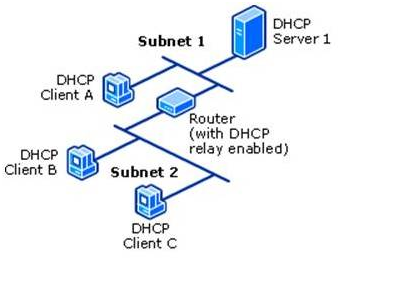
The DHCPv6 server is usually on a different link/subnet than most of its clients. On each link where the DHCPv6 server is not directly connected but clients are present, a router on the link must be configured as a relay agent. That router will typically be the one that also transmits RAs for that link as described by Internet Engineering Task Force (IETF) Request for Comments (RFC) 8106. Depending on the network topology, a series of cascading relay agents (either routers or computers) are configured on the intermediate links between the DHCPv6 server’s link and the clients’ links.

Note: A 2022 tutorial on the many aspects of DHCPv6 can be found in this All Things TECH IPv6 DHCP (DHCPv6) Server & Client Explained article.


2. Review of basic functionality and terminology for SLAAC

The article IPv6 Address Management – stateless, stateful, DHCP ... oh, my! discusses basic SLAAC, stateless DHCPv6 + SLAAC and stateful DHCPv6 addressing. Part 1 and part 2 of this article discusses SLAAC addressing in more detail. This article discusses two underlying features of IPv6 that enable SLAAC: Neighbor Discovery Protocol (NDP) and Internet Control Message Protocol (ICMP) for IPv6 (ICMPv6), while this article discusses Unique Local Addresses (ULA), and this article (and an update to it) discusses Extended Unique Identifier 64-bit (EUI-64) addressing. RFC 8981 discusses an extension to DHCP that enables hosts to generate temporary addresses with randomized interface identifiers.

Note: A 2022 tutorial on the many aspects of SLAAC can be found in this All Things TECH IPv6 Configuration, EUI-64, SLAAC & Dual Stack article and a tutorial on the many aspects of ICMPv6 can be found in this All Things TECH ICMPv6 and IPv6 Neighborships article.


3. Configuration examples for different DHCPv6 clients, servers, and relay agents

The National Institute of Standards and Technology Special Publication 800-119, Guidelines for the Secure Deployment of IPv6, was written by Sheila Frankel, et al, in 2010. It covers a wide range of subjects about the IPv6 protocol. In particular, section 3.5.4 and sections 4.7 through 4.7.3 (inclusive) discuss selected DHCPv6 and SLAAC topics:

  1. Tradeoffs between use DHCPv6 and SLAAC
  2. RA flag configurations
  3. Exchanges of messages between DHCPv6 server and client
  4. Security ramifications of DHCPv6.

The Samenwerkende Universitaire Reken Faciliteiten Network (SURFNet) IPv6 Deployment In Local Area Networks was written by François Kooman in 2011. It discusses static, SLAAC, and DHCPv6 address assignment mechanisms in more detail than SP800-119. It also discusses static, Recursive DNS Server (RDNSS), and DHCPv6 DNS assignment mechanisms.

On the PennState IPv6 Home website, this page provides configuration examples or links to examples for several DHCPv6 servers, including Cisco IOS, Dibbler, ISC, Nominium, and Microsoft Windows. That same page also provides configuration examples or links to examples for a variety of clients, including AIX, FreeBSD, Apple macOS and OS X (w/ Dibbler), Red Hat, Solaris, Ubuntu, and Microsoft Windows (w/ and w/o Dibbler). On the Juniper website, this article provides a configuration example for a Juniper JUNOS DHCPv6 server. This list of articles provides configuration documentation for DHCPv6 on Cisco IOS.

The article Setting up DHCPv6 to Dynamically Issue IPv6 Addresses in a Network describes the configuration of a Windows 2008 R2 (and later) dual-stack DHCP (DHCPv6 in addition to legacy DHCPv4) server and its clients while another article describes the configuration of a Windows 2012 (and later) dual-stack DHCP server. Maintaining pre-assigned static IPv6 addresses for routers and other infrastructure elements (DHCP Reservations), and how to set up more than one DHCP server are also covered.

Relay agent configurations for Nokia routers are described in this article, for Extreme Networks NetIron routers in this article (page 397), for Cisco IOS routers in this article, for Juniper JUNOS routers in this article, for Linux computers using dhcp6r or rtadvd, and for Microsoft Windows computers in this article. Additional relay agent configurations for Cisco Control And Provisioning of Wireless Access Points (CAPWAP) Access Controller (DHCPv6 Option 52 per RFC 5417), DHCPv6 Client Link-Layer Address Option per RFC 6939, and DNS Search List (DNSSL) Option per RFC 8106 are described in this article .


4. Definition and Prevention of rogue Router Advertisements (RAs)

On every link, there should be only one relay agent transmitting RAs. Whether by accident or malice, RAs transmitted by any unauthorized relay agent are called rogue RAs. By usurping the role of the relay agent authorized to send out RAs, such rogue RAs cause confusion and misconfiguration of other systems on the link. Rogue RAs are described in more detail by RFC 6104. Various vendors are actively implementing RA Guard, described by RFC 6105, to make it easier to detect and block Rogue RAs. RFC 7113, an update to RFC 6105, suggests ways to mitigate attempts to circumvent RA Guard.

A frequent source of accidental rogue RAs is the addition of a Microsoft Windows system that has Internet Connection Sharing enabled to an existing network, as discussed in the Windows Internet Connection Sharing (ICS) article in the Security section. Additional causes of rogue RAs and approaches to dealing with them are described in Section 5.2 of Nippon Telegraph and Telephone (NTT) Information Sharing Platform Laboratories Deploying IPv6: Problems and Solutions.

This Cisco white paper provides an in-depth description of the situation and suggests ways to detect and prevent rogue RAs. On the PennState IPv6 Home website, the IPv6 Security web page describes general IPv6 security techniques. In particular, the RA filtering and Rogue DHCPv6 server sections of that web page provide RA filtering or blocking suggestions for Cisco, HP, Juniper, and 3Com routers. This article discusses disabling RAs on both routers and hosts.


5. Reference documents for DHCPv6

  1. Nokia OS
  2. Extreme Networks NetIron IPv6 Configuration (page 139)
  3. Cisco IOS Switch and DHCP Server
  4. Juniper JUNOS 
  5. Oracle Solaris
  1. Enabling IPv6 in Microsoft Windows Application Servers
  2. Cloud Computing using IPv6
  3. IPv6 Knowledge Base: Infrastructure
  4. IPv6 in openSUSE Linux and SUSE Linux Enterprise Server (SLES)
  • 7
  • 8
  • 9
  • 10
  • 11
  • 12
  • 13
  • 14
  • 15
  • 16


2026 DoD High Performance Computing Modernization Program. HPCMP Privacy and Security Notice. DoD FOIA. DoD Web Policy.
Questions or comments please email HPCMP@HPC.mil. Web related issues please email WEBHELP@HPC.mil.
This Department of Defense computer is subject to monitoring at all times. Unauthorized access is prohibited by Public Law 99-474 (The Computer Fraud And Abuse Act of 1986)

Site Map
Information Quality
No Fear Act Data
Open GOV
Plain Writing Act
Privacy Program
Strategic APR
FOIA
Guidance & Policies
Privacy Policy USA.gov
     |      Contact Us

High Performance Computing Modernization Program Office

3909 Halls Ferry Rd
Vicksburg, MS 39180-6199

Phone: 601-634-4204 / 703-812-8205
Email: HPCMP@hpc.mil

For Web Issues please email webhelp@hpc.mil or call 703-812-4401

For DREN support, see the web page in this link.